Marketing and personalization 5 min read Mar 22, 2026

Launch Personalization Policy Graphs and Headless Decisions

Create Personalization policy graphs, simulate decisions, activate safely, and use headless decide endpoints without weakening privacy review.
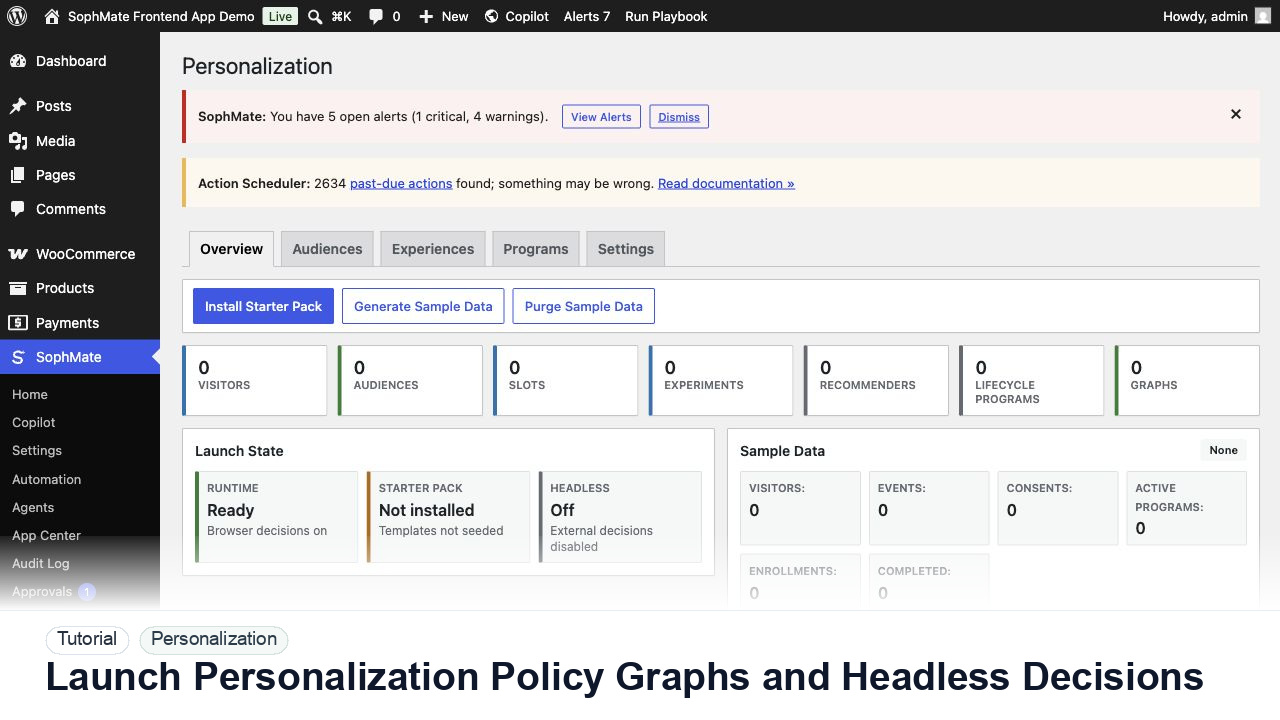
SophMate tutorial image for Launch Personalization Policy Graphs and Headless Decisions showing the related wp-admin workflow context.

Outcome

By the end of this tutorial, you will know how to use SophMate for SophMate personalization policy graph while keeping the work reviewable inside WordPress.

Scenario

A developer and growth lead want a homepage slot to use deterministic personalization on a cached storefront and a headless channel.

Buyer evaluation note

Use this tutorial to evaluate whether SophMate can personalize responsibly. Buyers should look for consent-aware audiences, fallback content, sensitive-page exclusions, explainability, experiment evidence, and privacy-owner review.

When not to use this workflow

  • Do not personalize with sensitive traits, hidden decisioning, missing consent, or no fallback content.
  • Do not declare experiment winners before sample size and measurement context are reliable.
  • Do not use this workflow to bypass the normal owner, reviewer, or approval path for production changes.
  • Defer the workflow when the source data, permission boundary, rollback owner, or customer impact cannot be explained.

Example operator request

Review this personalization slot before launch. Check consent state, audience logic, fallback content, sensitive-page exclusions, experiment metric, and privacy-owner approval.

What the image shows

The tutorial image shows the Personalization dashboard because audience, slot, sample data, graph health, and launch readiness need to be reviewed together.

Before you begin

  • Confirm consent state, audience rule, fallback content, sensitive-page exclusions, experiment metric, and privacy owner before activating a slot.
  • Prepare an explanation for why a visitor sees each variant so the experience stays inspectable.
  • Confirm SophMate is active, diagnostics do not show blocking failures, and the current user role can open the relevant SophMate module.
  • Check provider, budget, privacy, and approval settings before asking SophMate to draft or execute work.
  • Keep customer data, API keys, purchase codes, and private credentials out of prompts unless this workflow explicitly requires and permits that context.

Access and data boundary

  • Use consent-aware audience rules and avoid sensitive traits, sensitive pages, or hidden visitor profiling unless the privacy owner has approved the use case.
  • Keep fallback content available for visitors who are logged out, unconsented, unknown, or excluded from an experiment.
  • Use the least-privileged SophMate role that can complete the review, and keep administrator-only access limited to setup, provider, billing, diagnostics, and high-risk approval work.
  • Prefer record IDs, short excerpts, and redacted screenshots over full customer records, payment details, provider keys, purchase codes, or raw server logs.

Guardrail

Keep fallbacks valid and avoid sensitive traits or sensitive pages unless the privacy model explicitly allows the use case.

Common mistakes to avoid

  • Launching a slot before fallback content is complete.
  • Using sensitive traits or sensitive pages without explicit privacy review.
  • Declaring a winner before sample data and experiment results are stable enough to trust.

Step 1: Draft the policy graph

Describe audience, slot, fallback, experiment, and decision goal in plain language, then review the compiled graph before activation.

Step 2: Simulate visitor states

Test logged-out, returning, opted-out, no-match, locale, mobile, and sensitive-page scenarios before live traffic reaches the slot.

Step 3: Validate headless use

For headless decide requests, confirm authentication expectations, payload minimization, fallback behavior, and cache boundaries.

Step 4: Activate with a narrow slot

Launch one non-sensitive slot first and keep checkout, account, cart, and payment-adjacent surfaces on fallback until privacy review approves expansion.

Step 5: Review decision traces

Check exposure, fallback rate, errors, consent state, and whether the graph can be explained to support or privacy owners.

Review checklist

  • Graph simulation covers fallback states.
  • Headless payloads are minimized.
  • The first live slot avoids sensitive surfaces.

Production readiness

  • Test fallback content, consent state, sensitive-page exclusions, and experiment metric before enabling a slot.
  • Confirm the personalized output is explainable to support and privacy owners.
  • Run the workflow first on a narrow, low-risk record or page before expanding scope.
  • Confirm the reviewer, approval rule, and evidence location before any production-changing action runs.

Failure modes to test

  • Test missing consent, logged-out visitors, empty audience match, sensitive-page exclusion, experiment under-sampling, and fallback rendering.
  • Confirm visitors receive safe fallback content when targeting cannot be explained.
  • Test the path where the user lacks permission, required context is missing, or the reviewer rejects the result.
  • Confirm the failed state leaves an audit record, visible owner, and clear next action instead of a silent or ambiguous outcome.

Success signal

The personalization workflow is successful when fallback content works, audience logic is explainable, privacy review is complete, and experiment results guide the next decision.

Post-run monitoring

  • Watch fallback render rate, consent coverage, experiment sample size, treatment performance, and support questions.
  • Review whether audience logic remains explainable after live traffic reaches the slot.
  • Review the audit log, diagnostics, and affected WordPress records shortly after the first run.
  • Record any confusing output, missing source context, permission issue, cost spike, or reviewer correction before repeating the workflow.

Safe expansion criteria

  • Fallback content, consent behavior, sensitive-page exclusions, and experiment metrics are verified.
  • Support and privacy owners can explain why each audience or variant is safe.
  • The first run has a documented owner, evidence, review result, and stop path.
  • A second operator can repeat the workflow from the notes without relying on hidden context.

Rollback or stop path

If audience logic or consent behavior is unclear, disable the slot, serve fallback content, and review experiment evidence before relaunch.

What to document

Document audience rule, slot, fallback content, consent behavior, sensitive-page exclusions, explainability notes, and experiment success metric.

Owner and cadence

A growth owner should review experiment results, while a privacy owner reviews sensitive audience, consent, and fallback decisions before launch.

Escalate when

Escalate when audience rules, sensitive pages, consent state, or experiment interpretation affect privacy or customer trust.

Common questions

Can personalization use any visitor signal available to WordPress?

No. Use consent-aware, explainable audience rules and avoid sensitive traits or sensitive pages unless the privacy owner has approved the use case.

Does this workflow remove the need for human review?

No. SophMate should make the work easier to draft, inspect, approve, and repeat. Human review remains necessary when output affects customers, money, published content, privacy, settings, or workflow execution.

What should be documented before expanding the workflow?

Record the owner, input scope, access boundary, approval point, failure modes tested, evidence location, monitoring window, and rollback or stop path.

Next action

Launch the slot to a narrow audience or staging surface first, then compare fallback behavior, consent handling, and experiment evidence before broader exposure.

Next step

Bring this workflow into your WordPress site

Review the SophMate listing for current package details, screenshots, compatibility notes, and license terms.

View on CodeCanyon

Related

More from Marketing and personalization

Pro