Workflows and operations 6 min read Mar 1, 2026

Review Agent Coordination, Goals, and Provider Gateway

Review agent goals, coordination runs, provider gateway settings, versions, imported bundles, and artifacts before enabling autonomous work.
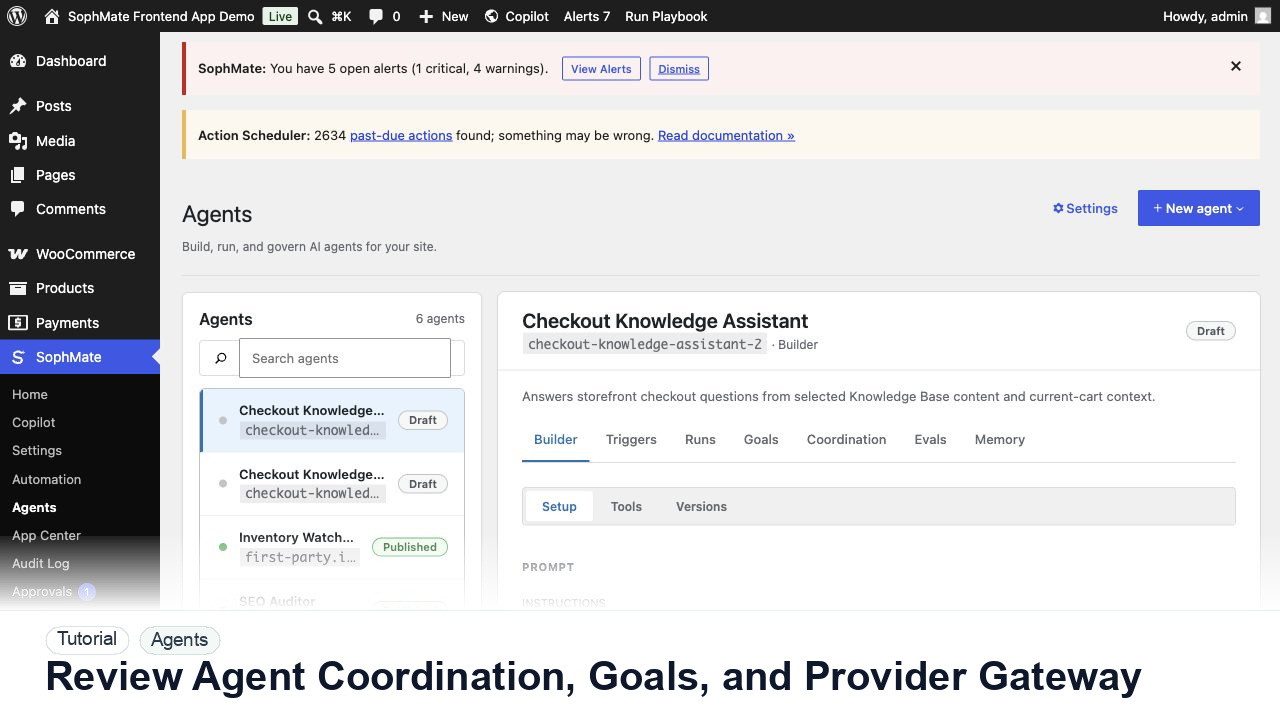
SophMate tutorial image for Review Agent Coordination, Goals, and Provider Gateway showing the related wp-admin workflow context.

Outcome

By the end of this tutorial, you will know how to use SophMate for SophMate agent coordination while keeping the work reviewable inside WordPress.

Scenario

An operations lead wants multiple agents to coordinate on support and store tasks, but needs proof that goals, tools, and providers are bounded.

Buyer evaluation note

Use this tutorial to evaluate whether SophMate agents are governed before they are powerful. Buyers should look for narrow purpose, allowed sources, tools, memory, refusal rules, eval cases, traces, and launch-surface review.

When not to use this workflow

  • Do not publish an agent with broad tools, broad sources, unclear refusal rules, or no eval coverage.
  • Do not expose customer-facing answers until traces prove the agent stays within purpose.
  • Do not use this workflow to bypass the normal owner, reviewer, or approval path for production changes.
  • Defer the workflow when the source data, permission boundary, rollback owner, or customer impact cannot be explained.

Example operator request

Review this agent before publishing. Confirm purpose, allowed sources, tools, memory, refusal rules, eval cases, launch surface, and trace review cadence.

What the image shows

The tutorial image shows Agents because agent quality depends on prompt scope, tools, triggers, runs, evals, memory, and trace review.

Before you begin

  • Define the agent purpose, allowed sources, tools, memory, refusal rules, eval cases, launch surface, and trace-review owner before publishing.
  • Keep customer-facing answers and write-capable tools disabled until evals and first traces are accepted.
  • Confirm SophMate is active, diagnostics do not show blocking failures, and the current user role can open the relevant SophMate module.
  • Check provider, budget, privacy, and approval settings before asking SophMate to draft or execute work.
  • Keep customer data, API keys, purchase codes, and private credentials out of prompts unless this workflow explicitly requires and permits that context.

Access and data boundary

  • Bind only the sources, memory, launch surfaces, and tools the agent needs for its stated purpose.
  • Keep customer-impacting tools, external calls, and write actions out of the agent until evals, traces, permissions, and refusal rules pass review.
  • Use the least-privileged SophMate role that can complete the review, and keep administrator-only access limited to setup, provider, billing, diagnostics, and high-risk approval work.
  • Prefer record IDs, short excerpts, and redacted screenshots over full customer records, payment details, provider keys, purchase codes, or raw server logs.

Guardrail

Keep agent scope narrow, bind only necessary tools and sources, and review run traces before publishing broadly.

Common mistakes to avoid

  • Giving the first agent too many tools, sources, and goals.
  • Publishing without eval cases for common questions and edge cases.
  • Failing to review traces after real users interact with the agent.

Step 1: Open the goal and plan

Review the goal, proposed plan, expected artifacts, allowed triggers, assigned agents, and whether the work is read-only or action-capable.

Step 2: Check provider gateway settings

Confirm model, budget behavior, fallback provider, rate-limit expectations, and whether the agent can continue after provider failure.

Step 3: Review coordination runs

Inspect which agent produced each step, what evidence it used, which tools it requested, and whether another agent challenged the output.

Step 4: Validate imported bundles

Treat imported agent bundles as untrusted until versions, tools, memory rules, provider settings, and approval requirements are reviewed locally.

Step 5: Keep artifacts attached to decisions

Do not approve agent output unless artifacts explain inputs, tool calls, rejected paths, and the final recommendation.

Review checklist

  • Goals and plans are bounded.
  • Provider gateway behavior is documented.
  • Artifacts explain coordinated agent decisions.

Production readiness

  • Run eval cases, review traces, verify allowed tools and sources, and keep the launch surface narrow.
  • Confirm refusal rules for sensitive, unsupported, or customer-impacting requests.
  • Run the workflow first on a narrow, low-risk record or page before expanding scope.
  • Confirm the reviewer, approval rule, and evidence location before any production-changing action runs.

Failure modes to test

  • Test failed evals, missing citations, unsafe tool requests, out-of-scope questions, memory mistakes, and trace review gaps.
  • Confirm the agent narrows, refuses, or escalates before tools or customer-facing answers expand.
  • Test the path where the user lacks permission, required context is missing, or the reviewer rejects the result.
  • Confirm the failed state leaves an audit record, visible owner, and clear next action instead of a silent or ambiguous outcome.

Success signal

The agent workflow is successful when evals pass, traces show the agent staying within scope, and tool or Knowledge Base use is easy to review after real runs.

Post-run monitoring

  • Inspect traces, eval failures, tool calls, citations, refusals, memory usage, and user feedback after launch.
  • Watch for requests outside the agent purpose before widening tools or surfaces.
  • Review the audit log, diagnostics, and affected WordPress records shortly after the first run.
  • Record any confusing output, missing source context, permission issue, cost spike, or reviewer correction before repeating the workflow.

Safe expansion criteria

  • Eval results, traces, sources, refusal behavior, and tool permissions are reviewed by the agent owner.
  • The agent stays within purpose during real requests before tools, memory, or launch surfaces expand.
  • The first run has a documented owner, evidence, review result, and stop path.
  • A second operator can repeat the workflow from the notes without relying on hidden context.

Rollback or stop path

If traces show unsafe answers or tool misuse, unpublish or narrow the agent, remove risky tools, update evals, and retest before exposing it again.

What to document

Document agent purpose, allowed sources, allowed tools, refusal rules, eval cases, launch surface, and run trace review cadence.

Owner and cadence

The agent owner should review evals before launch and run traces after launch, especially when tools or customer-facing answers are involved.

Escalate when

Escalate when an agent needs broader tools, handles customer-impacting answers, fails evals, or produces traces that are hard to explain.

Common questions

Can a first agent use every available tool?

No. Bind only the sources, memory, tools, and launch surfaces needed for the agent purpose, then expand after evals, traces, refusals, and permission checks pass.

Does this workflow remove the need for human review?

No. SophMate should make the work easier to draft, inspect, approve, and repeat. Human review remains necessary when output affects customers, money, published content, privacy, settings, or workflow execution.

What should be documented before expanding the workflow?

Record the owner, input scope, access boundary, approval point, failure modes tested, evidence location, monitoring window, and rollback or stop path.

Next action

Run the agent against its eval set and first trace review, then publish only when failed cases, refusal behavior, tools, and sources are documented.

Next step

Bring this workflow into your WordPress site

Review the SophMate listing for current package details, screenshots, compatibility notes, and license terms.

View on CodeCanyon

Related

More from Workflows and operations

Pro