WooCommerce operations 6 min read May 4, 2026

How to Fix Coupon Abuse in WooCommerce

Use SophMate to fix WooCommerce coupon abuse by reviewing usage patterns, stacking rules, limits, and approval-backed changes.
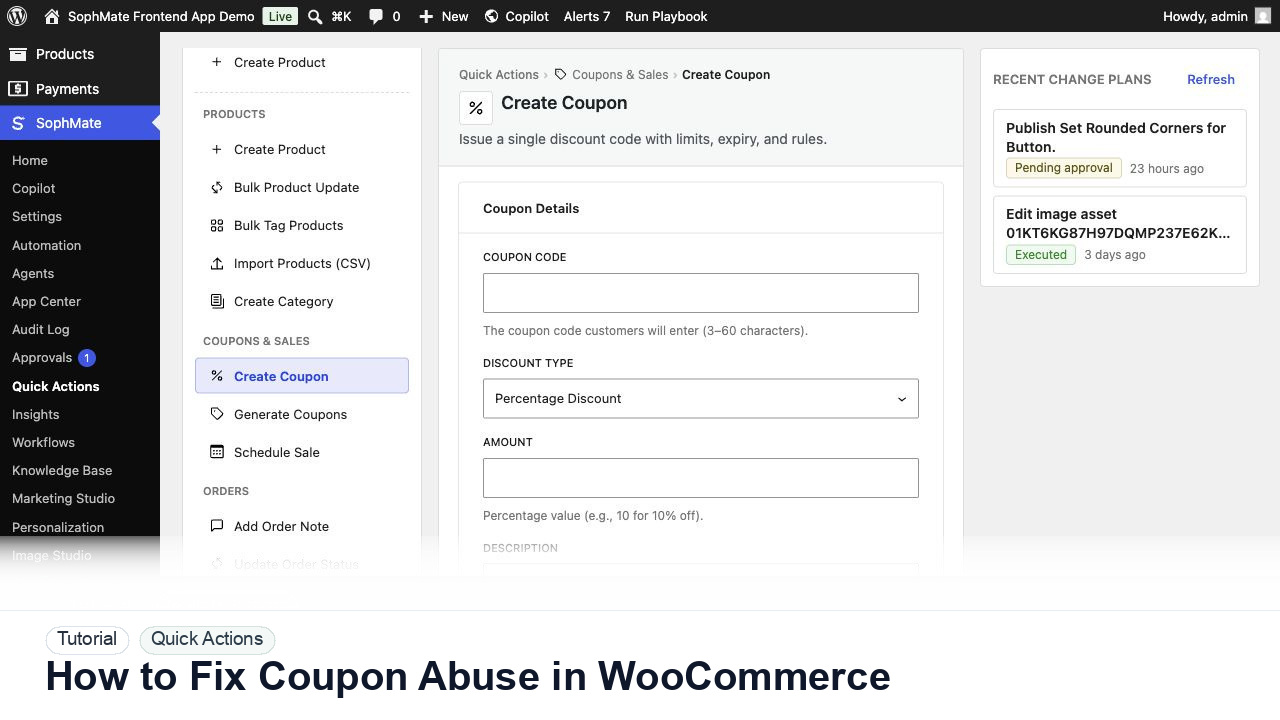
SophMate tutorial image for How to Fix Coupon Abuse in WooCommerce showing the related wp-admin workflow context.

Outcome

By the end of this tutorial, you will know how to use SophMate for fixing WooCommerce coupon abuse while keeping the work reviewable inside WordPress.

Scenario

A coupon appears on deal sites or stacks with another promotion, and the store needs to stop margin damage without breaking valid customers.

WooCommerce pain point

WooCommerce coupon abuse often appears as margin loss before the cause is obvious. The limitation is that stacking, missing expiry, broad product scope, deal-site leakage, and repeated customer use can interact.

SophMate resolution path

  • Use SophMate to summarize coupon usage, stacking behavior, scope, customer pattern, and campaign context.
  • Identify the exact abuse mechanism before changing settings.
  • Create an approval-backed cleanup plan that protects legitimate campaign use.

What to avoid in WooCommerce

  • Do not disable codes before checking live ads, emails, affiliates, and support scripts.
  • Do not treat all high usage as abuse without campaign context.
  • Do not change broad coupon rules without rollback notes.

Buyer evaluation note

Use this tutorial to evaluate whether SophMate turns common WooCommerce work into structured, reviewable operations. The value is not speed alone; it is predictable inputs, visible proposed fields, and confirmation after execution.

When not to use this workflow

  • Do not use Quick Actions when required fields are missing, record IDs are uncertain, or the change needs a custom policy decision first.
  • Do not repeat a Quick Action manually when it has become a recurring workflow with predictable inputs.
  • Do not use this workflow to bypass the normal owner, reviewer, or approval path for production changes.
  • Defer the workflow when the source data, permission boundary, rollback owner, or customer impact cannot be explained.

Example operator request

Prepare this Quick Action from structured fields only. Validate required inputs, show the generated plan, keep data-changing work behind review, and confirm the affected record after execution.

What the image shows

The tutorial image shows the Create Coupon quick action with discount type, amount, limits, and restrictions visible, matching the reviewed WooCommerce coupon workflow.

Before you begin

  • Gather exact product, coupon, order, customer, or workflow identifiers before opening the structured form.
  • Decide which fields are intentionally out of scope so the generated plan does not include unrelated changes.
  • Confirm SophMate is active, diagnostics do not show blocking failures, and the current user role can open the relevant SophMate module.
  • Check provider, budget, privacy, and approval settings before asking SophMate to draft or execute work.
  • Keep customer data, API keys, purchase codes, and private credentials out of prompts unless this workflow explicitly requires and permits that context.

Access and data boundary

  • Limit Quick Action inputs to the specific product, coupon, order, customer, or agent task being reviewed.
  • Keep structured forms out of broad customer exports, raw order histories, and unrelated private notes unless the workflow explicitly requires that context.
  • Use the least-privileged SophMate role that can complete the review, and keep administrator-only access limited to setup, provider, billing, diagnostics, and high-risk approval work.
  • Prefer record IDs, short excerpts, and redacted screenshots over full customer records, payment details, provider keys, purchase codes, or raw server logs.

Guardrail

Structured forms reduce ambiguity, but they still need review when they write WooCommerce or WordPress data.

Common mistakes to avoid

  • Treating structured input as automatic approval.
  • Leaving coupon limits, expiration, customer visibility, or order-note audience unclear.
  • Repeating the same Quick Action every week instead of promoting it into a playbook or workflow.

Step 1: Analyze coupon usage

Ask SophMate to summarize coupon usage by code, order value, customer pattern, product scope, sale-item behavior, and time period.

Step 2: Find abuse mechanisms

Check stacking, unlimited uses, missing expiry, broad categories, affiliate leakage, public deal posts, and customer-specific code reuse.

Step 3: Create a cleanup plan

Use an action plan to change expiry, limits, exclusions, product scope, or campaign status with affected coupon records listed.

Step 4: Protect legitimate orders

Review active campaigns, customer service exceptions, and live ad links before disabling codes.

Step 5: Monitor after cleanup

Track discount rate, support tickets, conversion, and repeated abuse patterns.

Review checklist

  • The abuse pattern is identified.
  • Legitimate campaign use is checked.
  • Coupon setting changes are approved.

Production readiness

  • Validate every required form field, generated plan, and post-execution record before using the action repeatedly.
  • Test storefront or admin behavior after execution when the action changes WooCommerce data.
  • Run the workflow first on a narrow, low-risk record or page before expanding scope.
  • Confirm the reviewer, approval rule, and evidence location before any production-changing action runs.

Failure modes to test

  • Test missing required fields, invalid coupon or product constraints, wrong record IDs, duplicate requests, and rejected action plans.
  • Confirm failed or rejected Quick Actions do not leave partial WooCommerce changes.
  • Test the path where the user lacks permission, required context is missing, or the reviewer rejects the result.
  • Confirm the failed state leaves an audit record, visible owner, and clear next action instead of a silent or ambiguous outcome.

Success signal

The Quick Action is successful when the structured fields produce the intended product, coupon, order, customer, or agent task and any data-changing result is visible in the approval or audit path.

Post-run monitoring

  • Verify changed products, coupons, orders, customers, or notes in wp-admin and, when relevant, on the storefront.
  • Watch for repeated manual corrections that indicate the Quick Action should become a refined playbook.
  • Review the audit log, diagnostics, and affected WordPress records shortly after the first run.
  • Record any confusing output, missing source context, permission issue, cost spike, or reviewer correction before repeating the workflow.

Safe expansion criteria

  • Reviewers understand affected records, fields, risk, decision notes, and execution results.
  • Rollback or correction notes exist for the record types the workflow can change.
  • The first run has a documented owner, evidence, review result, and stop path.
  • A second operator can repeat the workflow from the notes without relying on hidden context.

Rollback or stop path

If proposed fields are wrong, reject or revise the plan before execution. If execution already ran, use the audit trail and affected records to prepare a manual correction or rollback plan.

What to document

Document the exact structured fields used, expected WooCommerce result, reviewer, and storefront or admin check performed after execution.

Owner and cadence

The operator running the action owns the draft, while a reviewer owns execution when WordPress or WooCommerce data changes.

Escalate when

Escalate when a Quick Action affects the wrong record type, hides required fields, or produces a plan the reviewer cannot understand.

Common questions

Are Quick Actions safer than open-ended prompts?

They reduce ambiguity with structured fields, but they do not remove review needs. Any action that writes WordPress or WooCommerce data should still expose proposed fields and approval status.

Does this workflow remove the need for human review?

No. SophMate should make the work easier to draft, inspect, approve, and repeat. Human review remains necessary when output affects customers, money, published content, privacy, settings, or workflow execution.

What should be documented before expanding the workflow?

Record the owner, input scope, access boundary, approval point, failure modes tested, evidence location, monitoring window, and rollback or stop path.

Next action

Execute one low-risk Quick Action, confirm the affected WooCommerce record, and save the exact field set as the model for future structured actions.

Next step

Bring this workflow into your WordPress site

Review the SophMate listing for current package details, screenshots, compatibility notes, and license terms.

View on CodeCanyon

Related

More from WooCommerce operations

Pro