Copilot and playbooks 6 min read Mar 9, 2026

Govern Copilot Conversations, Attachments, and Share Links

Review Copilot conversations, branches, bookmarks, pins, attachments, team inbox state, exports, and share links without exposing private data.
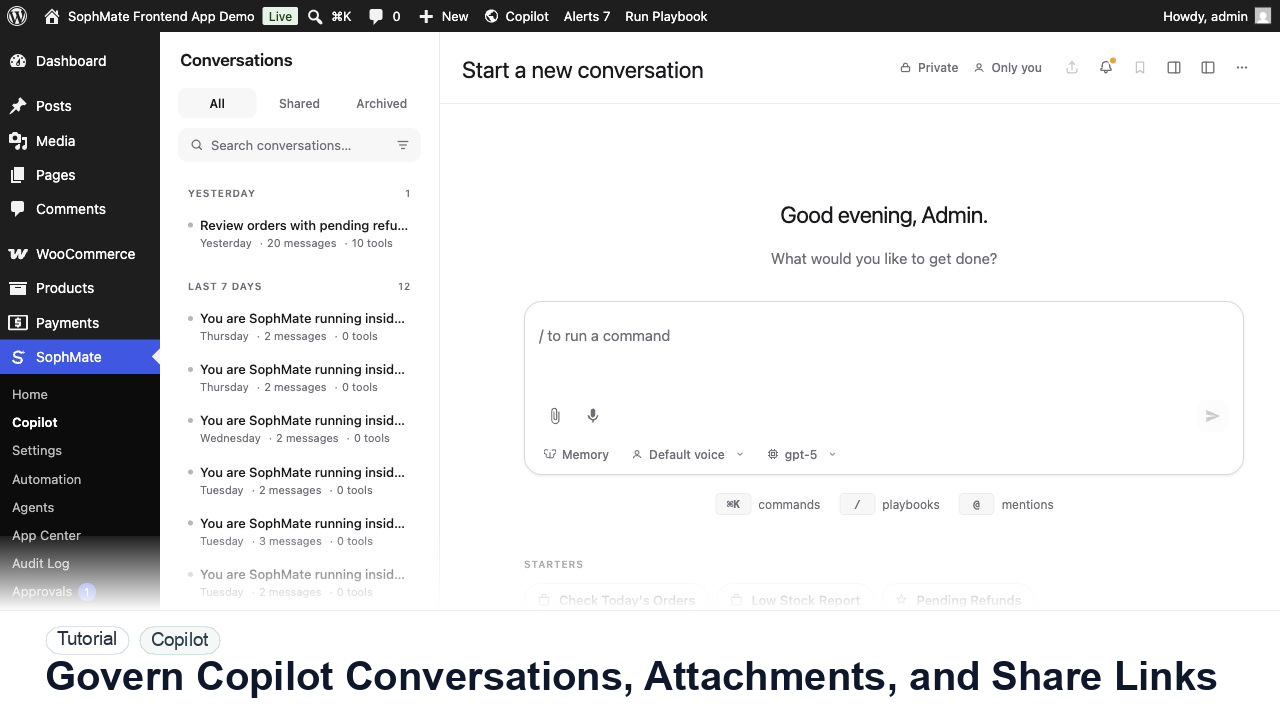
SophMate tutorial image for Govern Copilot Conversations, Attachments, and Share Links showing the related wp-admin workflow context.

Outcome

By the end of this tutorial, you will know how to use SophMate for SophMate Copilot conversation governance while keeping the work reviewable inside WordPress.

Scenario

A support lead wants to share a useful Copilot conversation with the team while keeping customer records and private attachments out of the link.

Buyer evaluation note

Use this tutorial to evaluate whether SophMate makes WordPress AI chat useful without creating untracked changes. The product signal is a clear path from read-only answers to reviewed action plans when a recommendation affects the site.

When not to use this workflow

  • Do not use chat as the final approval surface for product, coupon, customer, support, CSS, workflow, or settings changes.
  • Do not save order-specific, payment, credential, or private incident details into long-term memory.
  • Do not use this workflow to bypass the normal owner, reviewer, or approval path for production changes.
  • Defer the workflow when the source data, permission boundary, rollback owner, or customer impact cannot be explained.

Example operator request

Answer this as a read-only Copilot review. Use the visible WordPress or WooCommerce context, name assumptions, avoid saving private customer details to memory, and turn any site-changing recommendation into an action plan.

What the image shows

The tutorial image shows Copilot in wp-admin so the reader can connect the workflow to conversation history, slash commands, prompts, and the point where an answer may become a reviewed action plan.

Before you begin

  • Open the page or WooCommerce record that gives the prompt useful context, then decide whether the request should remain read-only.
  • Decide in advance which recommendations must become action plans instead of manual edits or chat-only decisions.
  • Confirm SophMate is active, diagnostics do not show blocking failures, and the current user role can open the relevant SophMate module.
  • Check provider, budget, privacy, and approval settings before asking SophMate to draft or execute work.
  • Keep customer data, API keys, purchase codes, and private credentials out of prompts unless this workflow explicitly requires and permits that context.

Access and data boundary

  • Keep Copilot prompts inside the current page or record context and avoid saving customer, order, payment, credential, or private incident details into memory.
  • Give non-admin users read-only question access before they receive approval, execution, budget, provider, or diagnostics privileges.
  • Use the least-privileged SophMate role that can complete the review, and keep administrator-only access limited to setup, provider, billing, diagnostics, and high-risk approval work.
  • Prefer record IDs, short excerpts, and redacted screenshots over full customer records, payment details, provider keys, purchase codes, or raw server logs.

Guardrail

Keep read-only questions conversational. When Copilot suggests changing products, coupons, content, customers, or settings, turn the recommendation into a reviewed plan.

Common mistakes to avoid

  • Starting with a broad command when a bounded read-only question would produce a safer answer.
  • Saving order-specific or private customer details into long-term memory.
  • Letting a recommendation turn into manual edits without a reviewed action plan.

Step 1: Review conversation scope first

Open the conversation and confirm site area, involved records, user, team inbox assignment, tags, bookmarks, pinned messages, and whether a branch changed the decision path.

Step 2: Inspect attachments before sharing

Check filenames, MIME types, source records, private data, and whether the attachment is still needed. Remove files that do not belong in team review.

Step 3: Use branches for alternative reasoning

Branch a conversation when testing a different prompt, model, or review path so the approved reasoning remains separate from exploration.

Step 4: Export or share only reviewed content

Before creating a share link or export, remove sensitive messages, confirm link audience, set expiry when available, and document why the conversation is useful.

Step 5: Archive stale work

Archive or tag old conversations after the decision is recorded so operators do not reuse outdated advice as current policy.

Review checklist

  • Attachments are reviewed before sharing.
  • Branches keep experiments separate from approved reasoning.
  • Exports and share links have a clear audience.

Production readiness

  • Keep the first prompt read-only and confirm which visible WordPress or WooCommerce context SophMate used.
  • Move site-changing recommendations into an action plan instead of copying instructions into manual edits.
  • Run the workflow first on a narrow, low-risk record or page before expanding scope.
  • Confirm the reviewer, approval rule, and evidence location before any production-changing action runs.

Failure modes to test

  • Test a broad unsafe prompt, missing page context, private customer detail, unsupported recommendation, and a site-changing request that should become an action plan.
  • Confirm Copilot refuses, narrows, or routes the work instead of implying execution approval.
  • Test the path where the user lacks permission, required context is missing, or the reviewer rejects the result.
  • Confirm the failed state leaves an audit record, visible owner, and clear next action instead of a silent or ambiguous outcome.

Success signal

The workflow is successful when Copilot produces a bounded answer, the user can verify the context, and any site-changing next step becomes a reviewed plan rather than an untracked edit.

Post-run monitoring

  • Review whether follow-up prompts stayed within visible context and whether any recommendation should have become an action plan.
  • Watch for repeated questions that deserve a playbook or Knowledge Base improvement.
  • Review the audit log, diagnostics, and affected WordPress records shortly after the first run.
  • Record any confusing output, missing source context, permission issue, cost spike, or reviewer correction before repeating the workflow.

Safe expansion criteria

  • Useful prompts have clear scope, source context, and a known handoff into action plans when changes are needed.
  • Repeated questions have been promoted into playbooks, docs, or Knowledge Base updates where appropriate.
  • The first run has a documented owner, evidence, review result, and stop path.
  • A second operator can repeat the workflow from the notes without relying on hidden context.

Rollback or stop path

If an answer is unsafe or unsupported, do not continue the thread as a change request. Start a narrower read-only prompt, improve source context, or move the work to a reviewed plan.

What to document

Document the prompt pattern, useful follow-up questions, source context used, and the point where the conversation should become an action plan.

Owner and cadence

The workflow owner should review this pattern after the first few uses, then promote stable prompts into playbooks when repeated work is clear.

Escalate when

Escalate when Copilot cannot access expected context, suggests unsafe changes repeatedly, or produces answers that cannot be verified from visible sources.

Common questions

Can Copilot make WooCommerce changes directly from chat?

Treat Copilot as the planning and review surface. Product, coupon, customer, support, CSS, workflow, or settings changes should become an action plan or another reviewed workflow before execution.

Does this workflow remove the need for human review?

No. SophMate should make the work easier to draft, inspect, approve, and repeat. Human review remains necessary when output affects customers, money, published content, privacy, settings, or workflow execution.

What should be documented before expanding the workflow?

Record the owner, input scope, access boundary, approval point, failure modes tested, evidence location, monitoring window, and rollback or stop path.

Next action

Run one read-only prompt, then convert only the safest useful recommendation into an action plan so the team can inspect the handoff from chat to governed change.

Next step

Bring this workflow into your WordPress site

Review the SophMate listing for current package details, screenshots, compatibility notes, and license terms.

View on CodeCanyon

Related

More from Copilot and playbooks

Pro